Deployment & support

Get your first agent running.
Keep it running.

Your team can deploy and build on the platform with our documentation. When you want more hands, add DT engineers for setup and integration, or training and support.

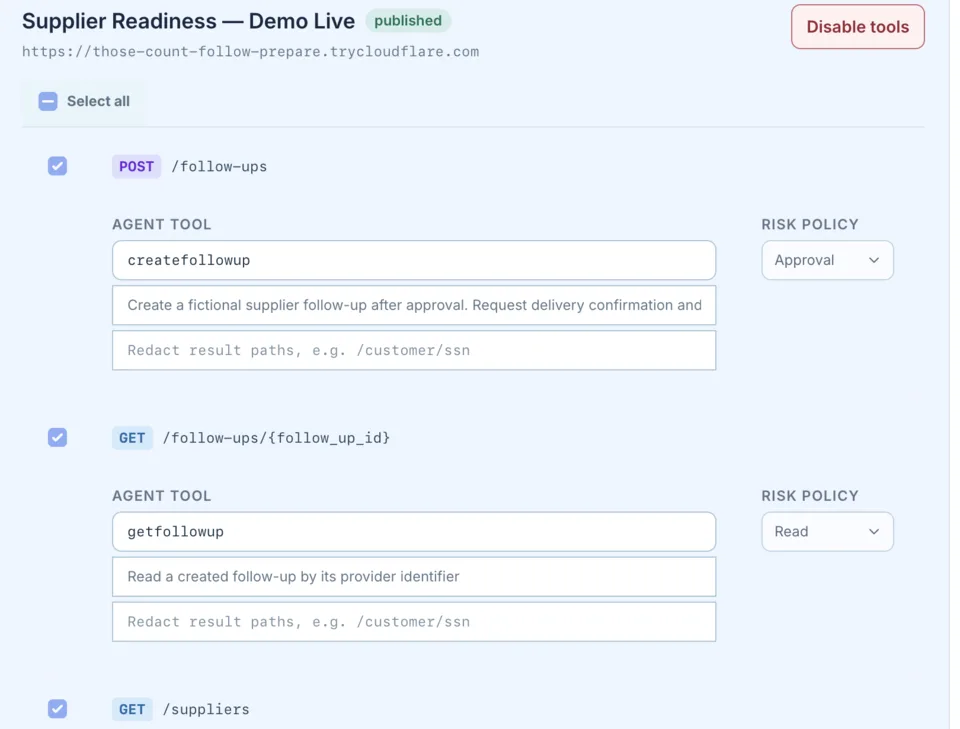
Integration catalog for a published API spec: each operation becomes an agent tool with a risk policy of Approval or Read.
A connected API, with a risk policy set for each operation. Actual product UI with demo data.

Configure and connect your systems

Engineers alongside your team

Training and support

01 / Options

Use as much help as you want.

The platform is the product. Some teams set up a first workflow on their own. Others want help connecting systems, engineers beside them for integration, or training and support for the people who will run it.

What’s included and how it’s accepted is written down before work begins.

01

How do I get my first agent running?

Setup and first workflow

Configure the platform, connect approved systems, set access and review controls, and test the workflow in its intended environment.

Includes: deployment configuration, integrations, acceptance tests, operating documentation, and a handoff plan.

Talk to engineering
02

What if our environment needs deeper integration?

Engineering help

Add DT engineers to your team for solution design or hands-on integration work on internal APIs, MCP tools, model integration, air-gapped deployment, and troubleshooting. Solution providers can keep their own delivery role.

Includes: integration changes, documentation, test results, and knowledge transfer to your team.

Talk to engineering
03

Can our team run it day to day?

Training and support

Prepare users and administrators for their roles, with support for troubleshooting, maintenance, and workflow updates.

Includes: role-based training, runbooks, a support contact path, and a maintenance plan.

Ask about support

02 / Path to production

Grow from one workflow to many.

Start small, test it with real users, and expand when the results support it.

01

Start

Pick one workflow and confirm the systems, access, and success criteria before configuring anything.

02

Test

Run representative work with real users and approved inputs. Check quality, failure modes, oversight, and operating cost.

03

Deploy

Build the connections and controls, document ownership, run acceptance tests, and roll it out.

04

Operate

Train users and administrators, set support responsibilities, and review results as the workflow changes.

03 / What’s included

The software, plus the help around it.

Your team can build and operate on the platform using DT’s documentation and integration interfaces. Engineering and support are optional add-ons.

01

Software subscription

Covers agreed access, enabled capabilities, and usage terms. Details depend on the intended deployment and organization.

02

Optional engineering

DT engineers can help with initial solution design or implementation: configuration, integrations, workflow development, testing, and handoff.

03

Hosting

DT runs on your hardware or in your cloud account, and your team owns the infrastructure, with DT assistance as needed. Operation by DT in an account we manage is considered case by case.

04

Support

Training, maintenance, troubleshooting, and ongoing engineering are defined in the support plan, including response commitments and coverage.

Explore integrations and developer interfaces, OEM and solution-provider partnerships, air-gapped deployment, or talk to engineering.

04 / Principles

However you deploy, the same standards apply.

Setup and support are meant to leave you with evidence you can review, in a way that respects your operating environment.

01

Mission-aware

The operating context, users, authorities, data, and tolerance for error shape the work from the beginning.

02

Evidence-first

Acceptance tests answer defined questions, and handoff documents explain why the platform is configured the way it is.

03

Security-conscious

Initial conversations stay unclassified and non-sensitive until scope and appropriate handling arrangements are established.

05 / Get started

See it on your workflow.
Then decide how much help you need.

Describe your goal and constraints at an unclassified and non-sensitive level. We’ll show you the platform and what a first deployment would take.