SIEM & Security Operations

Connect AI agent oversight
to your SIEM.

Forward selected agent-audit and Organization-security events to your security information and event management (SIEM) system. Inspect delivery status and verify indexed fields. Configure scoped response independently when your workflow needs an agent hold.

Two independent event families

Organization and operator routes

Scoped response with human recovery

Availability. Forwarding depends on the installation release and configuration, Organization eligibility, authorized roles, source capture, selected families and explicit destination activation. External response has independent deployment and Organization prerequisites. Confirm both paths for your intended deployment.

Architecture / Two paths

Send events out. Scope the response back.

Forwarding supplies selected records to a configured destination. Your team owns detection rules, target mapping and the playbook that calls the response API. Enabling a destination does not enable external response.

Forwarding

  1. Captured sources

    Selected agent.audit and organization.security events.

  2. Delivery queue

    Retained deliveries, routing revisions and retry state.

  3. Configured route

    Managed service or operator collector/bridge.

  4. Provider submission

    Ingestion acceptance or durable provider output.

  5. Indexed fields

    Independent search matches the source projection.

Optional response

  1. Your detection & playbook

    Map a trusted signal to an explicitly authorized agent.

  2. Scoped API request

    Authenticate as a security service identity.

  3. Durable hold

    Commit barriers, then reconcile cleanup and unresolved work.

  4. Human recovery

    Review outcomes, release the specific hold and admit fresh work.

Explanatory architecture, not a tested provider workflow. Receipt, indexing and response enforcement are separate states. A hold is recorded locally; its acceptance does not wait for SIEM delivery.

Sources / Schema 1

Two families. Different projections.

Both families carry their own schema marker, event identity, Organization identity and original source times. They have separate projections and source gates. Sharing a collector endpoint does not make them one stream.

Execution records

agent.audit

Retained Organization-agent events include a bounded summary of up to 500 characters, run/action/source references, recorded authority and outcomes, per-run sequence, event hash and available allowlisted model metadata.

Excluded: full evidence, prompt/tool bodies, private reasoning, credentials, arbitrary event details, complete model-routing lists and the separate data-flow projection.

Source gate: Organization-owned agents and instrumented producers, matching writers, applicable action-coverage activation and retained events. Audit View access is a separate visibility control.

Security activity

organization.security

Supported identity, membership/Team, credential, integration, SCIM, policy, access-review, export and emergency sources use a generated categorical body and approved identifiers. Selected intervention records can include service/agent/work IDs, HMAC correlation and work-state counters.

Excluded: raw summaries, names/emails, halt or release reasons, incident references, arbitrary changes/metadata, credentials and evidence.

Source gate: each producer’s recording, permission and deployment gates. Legacy security forwarding needs separate explicit activation; managed capture uses its applied destination selection.

Coverage starts with the source. Capture is prospective. Activation cannot reconstruct missing records or export every independent platform ledger. Personal-agent activity is outside these Organization streams; retention and producer-specific gaps remain relevant.

Correlate without merging distinct events. Use family, Organization and event ID for duplicate handling. Attempts and outcomes have different event IDs. Preserve original occurrence/capture times and valid zero counters. The retained agent event hash is not a checksum of the forwarded projection or a signature.

Review audit records and coverage

Deployment / Choose a route

Match the controls to the installation.

Organization-managed destinations, legacy installation OTLP and the standalone operator bridge have different owners and activation paths. Provider infrastructure and its ingestion/query permissions remain your deployment responsibilities.

01

Organization-managed destinations

Eligible Organizations maintain independent Splunk, Sentinel, Wazuh or OTLP destinations in External security → Audit forwarding. Owners, Admins and Security Admins manage; Auditors inspect sanitized settings and status. Active membership, SSO and recent authentication protect changes. Staff owns installation eligibility, delivery health, quotas and collector/managed-identity assignments.

02

Legacy installation OTLP

A trusted installation operator sets an explicit audit /v1/logs endpoint; ordinary application OTLP settings do not enable audit delivery. The agent dispatcher is installation-wide and can send retained backlog across Organizations. Organization-security capture/forwarding defaults off and requires its separate rollout and activation.

03

Standalone operator bridge

An operator deploys the continuous Sentinel/Wazuh bridge behind a collector, with optional separate Splunk fanout. Destinations are installation-wide. It needs existing source gates, ingestion and query access, authenticated TLS boundaries, one owner on persistent local quota-controlled storage, monitoring and backups. It is separate from the managed Organization UI.

Coordinated managed rollout. Matching migrations, application/bridge releases, updated and drained writers/workers, and a scheduler are prerequisites. Supported installers provision the private managed service; fresh installations allow all Organizations, while saved restrictions are preserved. The managed-service flag defaults on when unset, but every destination still needs explicit activation. Managed connections require certificate validation and restricted SIEM egress.

Cutover and legacy drain. The first acknowledged managed activation switches that Organization’s future source routing. Existing legacy deliveries drain to their original collector, which must remain available. Managed failure never falls back to installation OTLP. Adding a destination does not automatically send historical events.
Operations / Managed destinations

Operate capture and sending separately.

Save a destination and select its families, validate it, run a labeled synthetic test, then activate collection. Both families are selected initially; collection starts disabled. Synthetic tests check a projected connection path, not actual product capture.

Scroll the table horizontally to compare controls.

What changes, and what remains to reconcile
ControlEffect and operating boundary
Inspect statusRead desired/applied revisions, pending/failed/accepted application work, bridge pending/submitting/submitted/blocked work, oldest backlog, sanitized failures and available indexed confirmation. Starting, unavailable, stale, disabled or incompatible delivery service states need operator attention.
Pause sendingContinue collecting and retain backlog while sending is paused. A provider submission already in flight can finish before the pause applies. Keep control synchronization healthy.
Stop collectingPrevent new deliveries to that destination after the change is applied. Existing queued work remains. Applied family changes affect future capture; queued deliveries retain their original revision and selection.
Repair or replaceRepair credentials/trust while retaining backlog. For an endpoint, index, workspace or output-identity change, stop collection, drain application and bridge work and obtain fresh status before editing; alternatively create a replacement destination.
Replay or retryPreview/apply bounded pages for one destination/revision/family and an occurrence range up to 31 days. Replay creates missing deliveries; retry resets eligible failures. Provider retry has a separate bounded preview of blocked work. Neither operation automatically resends accepted/indexed deliveries or recovers purged sources.
RetireStop new collection while keeping unfinished work, pause/resume, inspection and bounded recovery available. Retirement is not deletion of the backlog.

Plan for outages and duplicates. Application retry budgets, source retention, finite collector/bridge storage and provider limits apply. Backpressure can stop acceptance. Preserve pending/quarantined work, repair the cause and inspect recovery. An unavailable query cannot prove that submission failed. Lost acknowledgements or resubmission can produce duplicates.

Keep the operating boundaries visible. Durable queues support recovery; they do not provide exactly-once delivery, global order or permanent archival. Source retention can remove pending application work. Provider copies have separate retention, and host/volume loss requires protected backup recovery.

Verification / Provider boundaries

Receipt is the first checkpoint.

Verify each selected family on your actual route. Preserve family, Organization and event IDs, original source times and projected values. Inspect raw duplicates before applying your investigation’s deduplication.

  1. 01 / Acceptance

    Collector or bridge receipt

    The application queue records acceptance at its configured receiver. This does not establish provider submission or indexing.

  2. 02 / Submission

    Provider received the submission

    HEC/API success or durable Wazuh output establishes submission at that boundary. Searchable fields remain a separate check.

  3. 03 / Confirmation

    Search matches indexed fields

    A complete successful provider query matches the source projection, including present optional values. Query failure or an empty result is not confirmation.

Scroll the table horizontally to read each provider’s requirements.

Supported mechanisms; qualification depends on the route
DestinationSupported routeVerification boundary
SplunkHEC ingestion. Managed destinations preserve structured fields and can use an optional read-only search credential for indexed-field confirmation. Legacy collector-to-HEC is a separate route.Without managed search credentials, status reports submission only. The legacy HEC exporter does not poll indexer acknowledgements; verify actual search results. Its queue and retry budget are separate from the application queue.
Microsoft SentinelPublic-Azure Logs Ingestion API with separate agent/security streams and Analytics tables. Ingestion and query identities need their respective grants; managed identities must be assigned to the Organization by staff.Table and DCR schemas must agree. Provisioned schemas or an ingestion API success do not establish indexed fields. Synthetic security-only batch recipes do not qualify continuous product delivery or response.
WazuhAn enrolled collector reads JSONL output through configured rules, Filebeat and indexer routing. Managed destinations use a staff-bound collector and an isolated Organization/destination directory.Tenant users cannot select arbitrary host paths. A durable file write is submission; complete indexer field matches establish indexing. Enrollment, rule thresholds and read-only query access remain deployment inputs.
Custom OTLPAn HTTPS HTTP/protobuf logs receiver, with secret headers, trusted CA, optional matching client certificate/key, and supported compression on the managed route.Acceptance establishes collector receipt. Downstream transformation, indexing and detection need their own verification; OTLP status does not confirm a searchable SIEM record.
Recorded provider evidence and open qualification

Synthetic security-v1 ingestion/indexing was observed in Splunk, Sentinel and Wazuh test deployments. That establishes those synthetic routes only.

An October 1, 2026 actual-product run matched 102 unique Wazuh events and a clean 19-event Splunk subset, with specific Wazuh recovery observations. Provider resource failures and interrupted Splunk recovery prevented sustained concurrent-provider acceptance. Splunk’s observed subset did not expose every OTLP envelope field as searchable data.

Sentinel’s later bridge table/DCR schema was provisioned and read back; this did not submit or verify live bridge events. Managed two-Organization/multi-provider operations and exact-release response qualification remain separate acceptance work. Supported configuration and passing synthetic/source checks do not establish production acceptance for every topology.

Observed example / October 9, 2026

One denied event, found in Splunk.

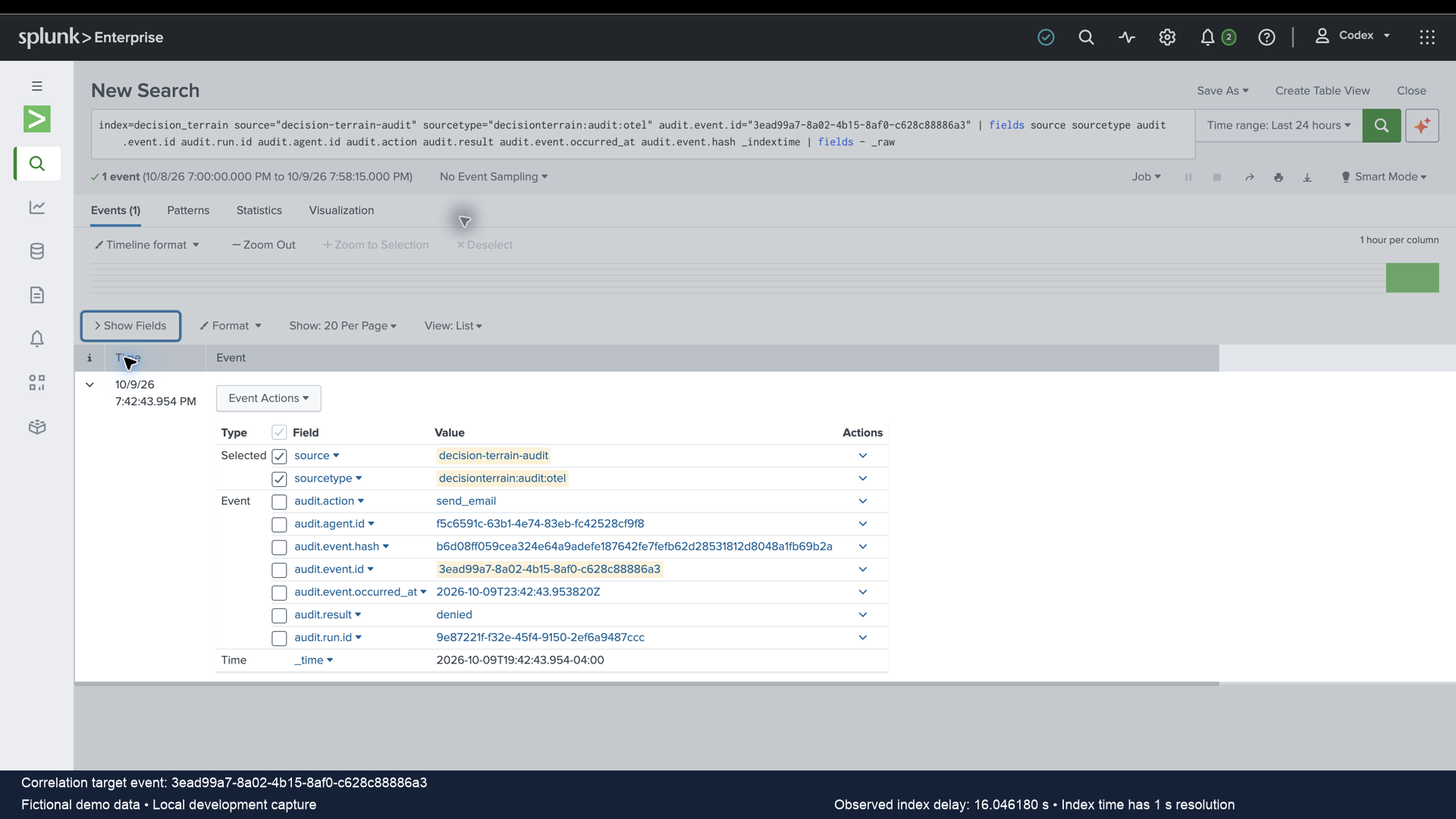
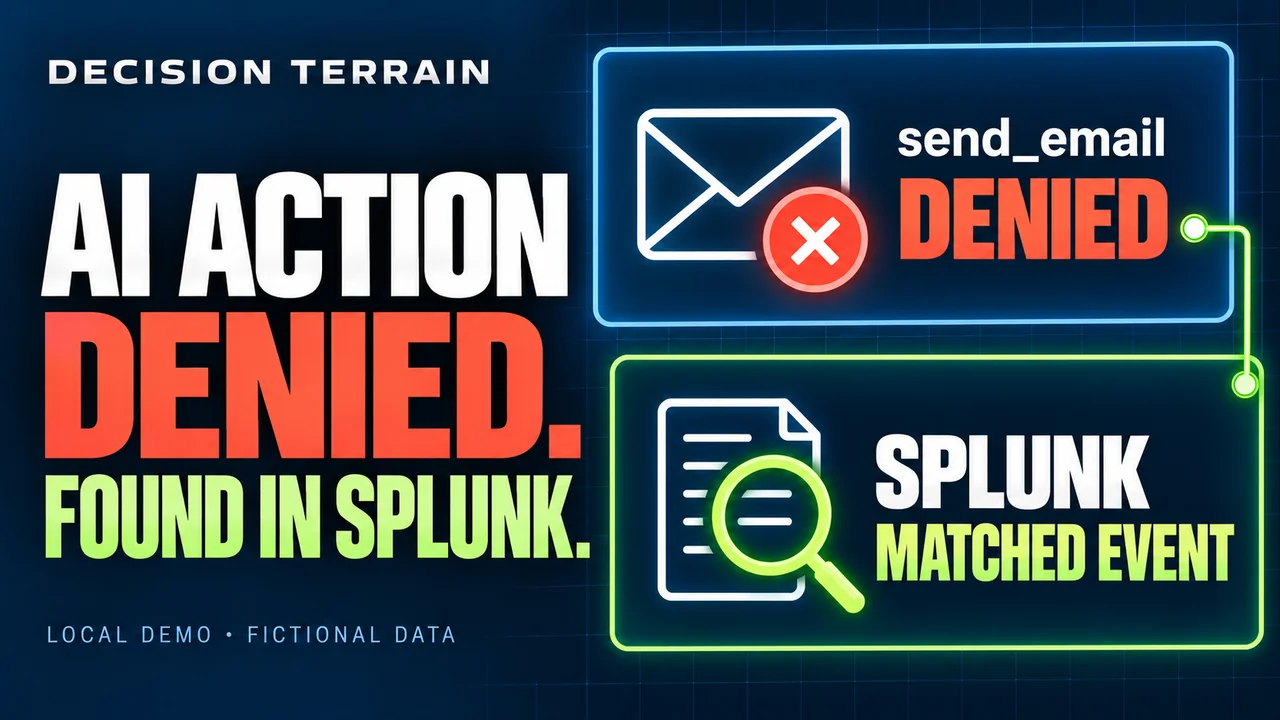
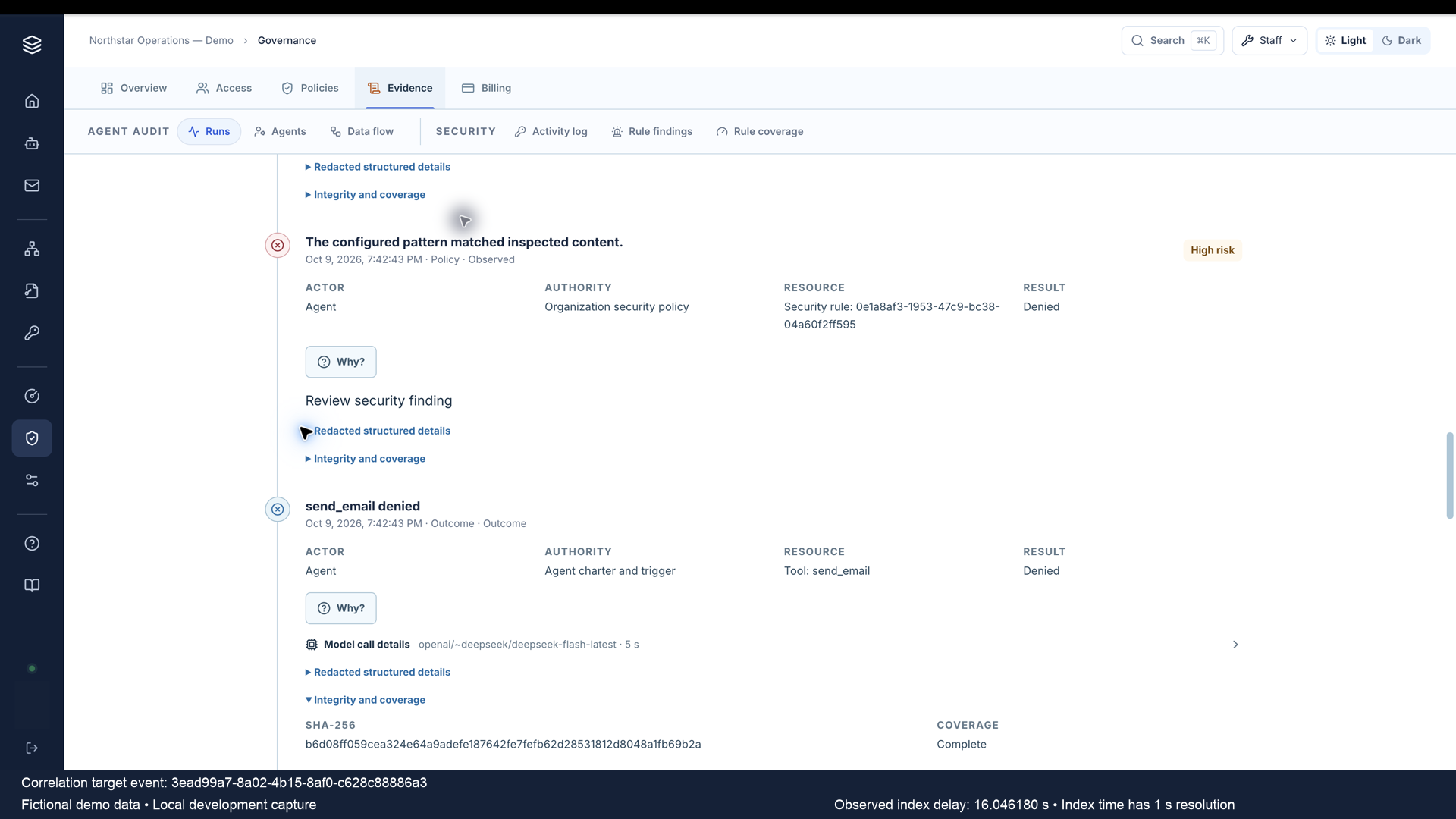
Rowan’s fictional marked email attempt was denied before dispatch. The normal minute dispatcher forwarded its real agent-audit event through the local legacy OTLP route. Splunk’s exact-event search returned a matching indexed record.

Decision Terrain thumbnail reading AI action denied, found in Splunk, with illustrated denied email and matching-event cards. Local demo; fictional data.
A narrated local demo with fictional data: one denied email event found in Splunk. A 35-second demonstration followed by a 10-second closing card.

Playing this video loads content from YouTube.

Local Decision Terrain audit timeline showing send_email denied and the retained event hash, with Fictional demo data and Local development capture disclosure.
Product record. Policy and denied outcome are separate events. The displayed hash belongs to the selected outcome; this attempt created no email delivery. View product record at full resolution
Splunk selected-field result showing send_email, denied, and matching event, agent and run IDs, occurrence time and hash. Fictional demo data; local development capture.
Indexed fields. The selected-field view matches the event, agent, run, outcome, source time and hash. Stored raw data was preserved; this view omits the raw body. View indexed record at full resolution
Shared event ID
3ead99a7-8a02-4b15-8af0-c628c88886a3
Original occurrence / UTC
Splunk index time / UTC
Second-resolution index time
Observed occurrence-to-index delay
16.046180 seconds One observation; no latency SLA

Scope of this capture. Fictional demo data, local development, one agent.audit event through installation-wide OTLP. The collector had a preexisting TLS-validation exception and no persistent queue. This does not qualify managed routing, organization.security delivery, production TLS/durability, outage/restart recovery, deduplication or automated response. The source action and indexing preceded filming; editorial captions identify the correlation and measured delay.

Read the video description and open the original clip

Text description. At 0–10 seconds, the product timeline shows the policy decision, denied email outcome and hash. At 10–22 seconds, Splunk’s transposed exact-event result shows the matching IDs, original occurrence and separate index time. At 22–35 seconds, the expanded selected-field result includes the matching hash. Fictional/local disclosure stays visible throughout the demonstration. At 35–45 seconds, a closing card invites viewers to discuss their security integration and points to the link in the YouTube description. Preparation and idle waits were removed; retained scenes play at original speed. Narration and music were added afterwards; the voice is AI-generated. The video duration is not the forwarding delay.

Open the original 35-second silent correlation clip.

Response / Independently configured

Request a scoped hold. Inspect the outcome.

The vendor-neutral response API can create and read an intervention and read effective agent control state. It requires a non-human security service identity with an explicit allowlist of Organization-owned agents. There is no Organization wildcard or run-specific target.

Authorize the sender

Installation readiness, dedicated credential readiness, HTTPS and effective Organization response access are separate prerequisites. Owners, Admins and Security Admins manage identities; Auditors inspect. Read-only is the UI default. A create-and-poll integration needs both security:halt and security:read, its own security bearer credential and trusted exact-agent mapping. An ordinary Organization API key is not a substitute.

Reconcile the request

202 Accepted means the intervention and admission/dispatch barriers committed, not universal termination. Retain the intervention ID and poll intervention plus target control state. Inspect lifecycle, hold_active, worker acknowledgement and unresolved work separately; a worker acknowledgement does not certify remote provider cancellation.

Retry with the same identity

Idempotency binds service identity and external event ID. Retry an ambiguous request with the same ID and semantics. Credential rotation preserves that namespace; a new identity changes it. Replaying a released request returns that intervention without another hold. Integrations cannot release, resume or set a hold expiry.

Scroll the table horizontally to read response states.

Lifecycle is separate from whether a hold is active
StateWhat the evidence means
acceptedThe hold, barriers and local evidence committed; cleanup may not have started.
enforcingCancellation and reconciliation are in progress while the barriers remain active.
enforcedRequired cleanup is verified and all known work for this intervention is terminal or cancelled.
partially_enforcedIncluded cleanup is verified, but tracked work remains pending, cancellation-requested, unknown or failed.
failedRequired platform cleanup or verification failed. The hold remains active.
releasedThis hold is inactive. Another hold or emergency latch may still block the agent.

Already dispatched work. A dispatch committed before the hold can remain in flight. Completed or provider-accepted effects cannot be recalled. Unsupported or uncertain cancellation can remain Unknown. There is no universal termination or enforcement-time SLA.

Inspect effective control. The recent-interventions UI may omit older active holds. Retain accepted IDs and use target control state to read all active intervention IDs and categorized work counts. Ordinary roster/chat badges are not authoritative halt indicators.

Recovery / Authorized people

Release one hold. Admit fresh work.

Independent incidents can create overlapping holds. Releasing one does not release the others. Closing an external incident, disabling an identity or revoking its credential also leaves existing holds in place.

  1. 01 / Review

    Resolve the incident

    An authorized human reviews cleanup and unresolved outcomes. Failed required cleanup prevents final release; retry enforcement and verify recovery first.

  2. 02 / Release

    Record the decision

    Record a reason, confirm the exact agent name, acknowledge unresolved outcomes and satisfy recent authentication and applicable SSO. Human inspection/recovery remains available when external response is disabled.

  3. 03 / Continue

    Start deliberate new work

    Final release advances the execution generation after verified recovery. It does not replay cancelled work, restore revoked grants or resume stale approvals. Continuation requires fresh admission.

Response evidence. Recorded Splunk exercises demonstrate specific automatic holds through native alerts and a repository-owned test adapter, with partial enforcement and unknown outcomes. Staff-only preview controls and controlled-workload demonstrations are not generally available kill switches or proof of an external provider response loop. Shipped vendor-specific response adapters and complete exact-release response qualification remain separate work.

Review scope and recovery for your deployment

Implementation

Map the route your team will operate.

Bring your SIEM, deployment topology and intended response workflow. We’ll review source coverage, eligibility, permissions, delivery verification, retention and human recovery for that configuration.