Free AI risk assessment tool · Public alpha

NIST AI RMF Checklist
Your AI, in plain sight.

Give your AI system a nutrition label. Use AI Facts to document system facts, safeguards, evidence, and unanswered questions with a checklist mapped to the NIST AI Risk Management Framework (AI RMF 1.0).

An independent Decision Terrain resource. Not affiliated with, sponsored by, or endorsed by NIST. Answers are self-reported; this tool does not verify evidence or establish certification, compliance, or safety.

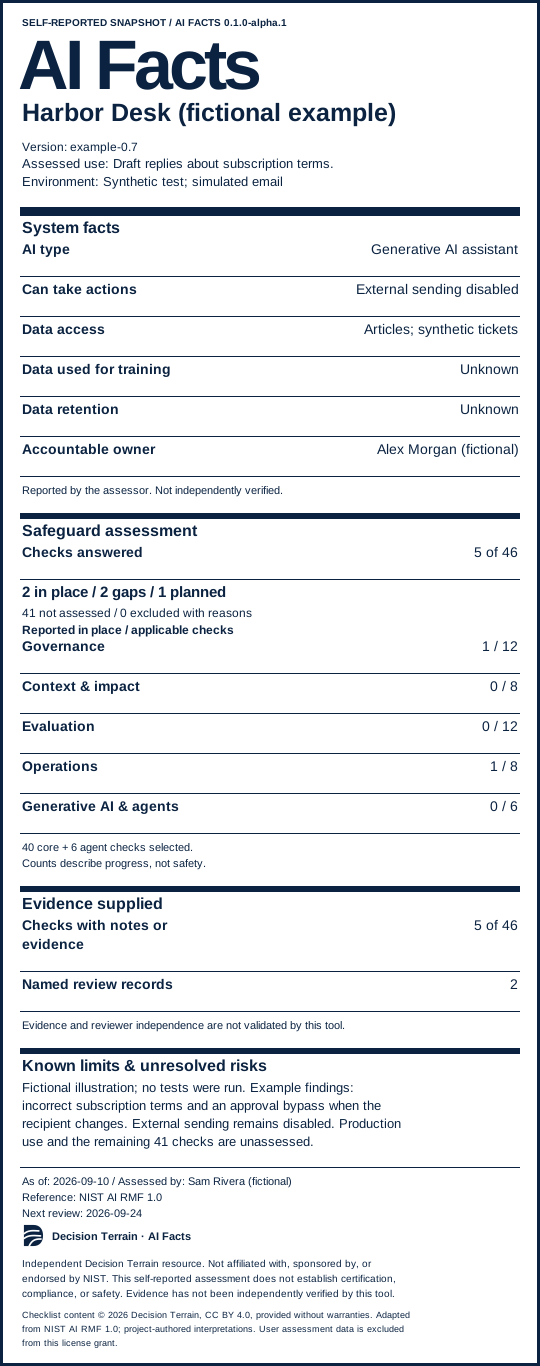
Example AI nutrition label

Harbor Desk, a fictional support assistant: 5 of 46 checks answered, 2 safeguards in place, 2 gaps, 1 planned, and 41 not assessed. Training and retention practices are unknown.

A partial assessment. A clearer picture. Fictional system, people, and findings. No tests were run.

View the full example

Gluten-free. May contain hallucinations.

AI Facts by Decision Terrain

Build your AI nutrition label

PUBLIC ALPHA

No account required. Your assessment saves in this browser. Export a backup to move it between devices or from another AI Facts address. Keep entries unclassified and non-sensitive.

Loading the checklist…

What are you assessing?

Start with what you know. You can add details later; anything unanswered stays visible on your label.

Add more system details (optional)

Saved in this browser on this device. Nothing you enter is uploaded. Export a JSON backup to keep or move your assessment.

Independent resource by Decision Terrain. Not affiliated with, sponsored by, or endorsed by NIST. This tool does not certify systems or verify evidence.

Read NIST AI RMF 1.0 ↗Licensing & brand useChecklist v0.1.0-draft · Not yet saved

Embed your label

This SVG includes the scope, self-reported status, unknowns, and NIST non-affiliation notice. Regenerate it after updating your assessment.

From system facts to a shareable label

How to use the AI risk assessment checklist

  1. Define the system and its use.

    Enter a system name, assessed use, and assessment date. Add its owner, environment, data access, and limits when known. Scope the review to a particular use of AI.

  2. Record practices and evidence.

    Work through 40 core checks. Include six additional checks for generative AI or agents when relevant. Mark the current status and add evidence notes, owners, next actions, and review details.

  3. Generate and share the snapshot.

    Download an SVG or HTML nutrition label, a full HTML assessment report, or a JSON backup. Print or save as PDF from your browser. Gaps, unknowns, and exclusions remain visible.

NIST AI RMF 1.0 mapping

Four functions. Forty core checks.

Our project-authored checks map to all 72 AI RMF 1.0 subcategories across Govern, Map, Measure, and Manage. The mapping traces topics; your system may require additional criteria and evidence.

Govern: responsibility and oversight

Record who owns AI risk decisions, which policies apply, and how people raise concerns.

Browse 12 checks
  • G01 Know which AI systems you operate
  • G02 Give people responsibility and authority
  • G03 Put risk policies into everyday work
  • G04 Define acceptable risk before making decisions
  • G05 Review whether risk management is working
  • G06 Prepare personnel and partners for their roles
  • G07 Bring diverse experience into risk decisions
  • G08 Make human oversight specific and usable
  • G09 Make risks safe to report and hard to ignore
  • G10 Turn outside feedback into decisions
  • G11 Set supplier rules and failure contingencies
  • G12 Plan a safe retirement

Map: context and potential impact

Describe the system’s purpose, operating context, affected people, and foreseeable harms.

Browse 8 checks
  • M01 Describe the purpose and operating context
  • M02 Translate the intended use into system requirements
  • M03 Explain limitations and prepare operators
  • M04 Check data and evaluation assumptions
  • M05 Compare expected benefits and costs
  • M06 Map risks across the whole system
  • M07 Assess impacts on people and the wider environment
  • M08 Keep affected people involved

Measure: evaluation and evidence

Document evaluation methods, test results, limitations, and gaps in what you know.

Browse 12 checks
  • E01 Choose useful measures and expose blind spots
  • E02 Get review beyond the original developers
  • E03 Make evaluations reproducible and relevant
  • E04 Demonstrate validity and reliability
  • E05 Test safety and failure behavior
  • E06 Evaluate security and resilience
  • E07 Evaluate transparency and understandable outputs
  • E08 Evaluate privacy impacts
  • E09 Evaluate fairness and harmful bias
  • E10 Assess environmental impacts
  • E11 Watch production and emerging risks
  • E12 Use feedback to test whether measurements hold up

Manage: response and ongoing review

Plan how to prioritize risks, monitor the system, respond to incidents, and revisit decisions.

Browse 8 checks
  • R01 Make an explicit deployment decision
  • R02 Prioritize risks and act on them
  • R03 Document and communicate remaining risks
  • R04 Fund risk controls and reassess the value of AI
  • R05 Respond to incidents and newly discovered risks
  • R06 Be able to stop or override unsafe operation
  • R07 Monitor third-party resources and model changes
  • R08 Operate a complete monitoring and improvement process

Working with generative AI or agents? The optional six-check profile adds questions about generated content, tools, permissions, and external actions. It is not a complete mapping to NIST’s separate Generative AI Profile. Turning the profile off is shown on your label.

Using AI Facts

Frequently asked questions

What is an AI nutrition label?

An AI nutrition label is a compact summary of a system’s purpose, data practices, reported safeguards, and limitations. AI Facts puts those details alongside counts of answered checks, evidence notes, and reported reviews so readers can see what has been supplied and what remains unknown.

Is this an official NIST checklist?

No. AI Facts is an independent Decision Terrain interpretation of NIST AI RMF 1.0. NIST describes its framework as voluntary and adaptable, and its Core actions are not a checklist. Use the official NIST framework alongside our mapping and completion criteria. Completing these checks is not NIST certification.

Are my answers uploaded or stored?

The editor does not upload your system facts, answers, evidence notes, or imported files. Drafts are saved in local storage in this browser for this site. Clearing browser data removes them. Export a JSON backup to keep a separate copy or move your assessment to another browser, device, or AI Facts address. Google Analytics measures page visits and actions such as creating, exporting, printing, or copying a label. These usage events exclude your assessment content, entered URLs, and file names.

Can I import an assessment from the original tool?

Yes. Export a JSON backup from the original AI Facts editor, then choose “Import assessment” here. Backups using assessment schema 1 and checklist 0.1.0-draft are compatible. Importing opens a draft and asks before replacing your current assessment; it does not automatically publish a label.

Do I need to complete every check before generating a label?

No. Enter the required system facts and generate a partial assessment. Unanswered checks and gaps remain visible. Every check marked not applicable needs an exclusion reason. An “in place” answer is self-reported, and the tool counts evidence notes and named review records separately without verifying them.

What can I download, and does sharing a label publish my assessment?

You can download an SVG label, a readable HTML label, a full HTML assessment report, and an importable JSON backup. You can also copy SVG embed markup or print to PDF. Downloads are files on your device. Adding a public assessment URL creates a link on the label; it does not host or publish your assessment. Review exported notes before sharing them.

What does public alpha mean for this tool?

This is release 0.1.0-alpha.1, using checklist 0.1.0-draft. The checklist has not been tested through a real organizational assessment. It is available for exploration and practitioner feedback. It does not calculate a safety score or make a deployment decision. Review the source and contribute feedback on GitHub.
Sources and reuse

Open code. Traceable checklist content.

AI Facts software is MIT-licensed. Original checklist content is CC BY 4.0, and Decision Terrain brand artwork has separate terms. Your independently supplied assessment data remains outside those license grants. Exports retain the project’s attribution and notices.

Make the gaps actionable

Turn assessment questions into a plan.

Decision Terrain helps defense and national security teams connect AI readiness, technology evaluation, and implementation to the evidence a decision needs.

AI strategy and readiness · Independent AI technology evaluation

Discuss your AI assessment